Single-file page45.5 KB
Lio Maren motion designer bio page template
A link page laid out like an animation timeline: every link is a layer with keyframes, over a live shader you can switch between three looks.
- Free to use
- Your own address
- Live in seconds
- Yours to edit
About this template
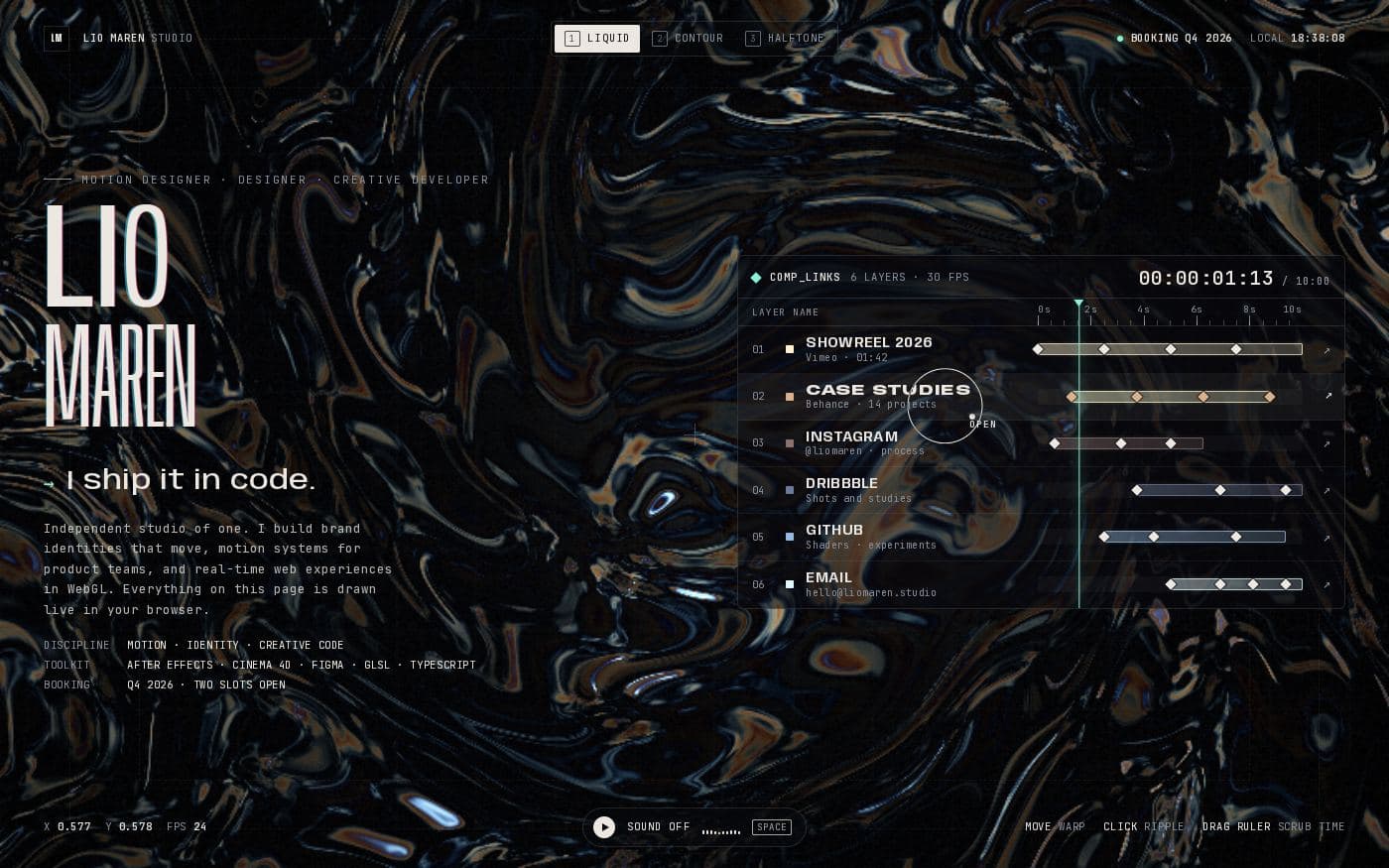
A link-in-bio page for people who think in keyframes. Your name sits large on the left with a tagline that cycles through three lines, a short bio and a few facts — discipline, toolkit, when you're booking. On the right is a composition panel: each link is a layer on a ten-second timeline with its own coloured bar and keyframe diamonds, a playhead sweeps across, and a timecode counts up. Drag the ruler to scrub time yourself.
Behind it runs a full-screen shader drawn live in the browser, with three looks to switch between from the top bar or the 1, 2 and 3 keys: liquid marble, contour lines and halftone. Moving the mouse warps it, clicking sends a ripple, and hovering a layer tints the whole scene in that link's colour. Sound is off until the visitor turns it on (the button, or the space bar) and then every hover and click has its own small synthesised note. Visitors who prefer reduced motion get a slower, calmer version.
Who it is for. Motion designers, animators, 3D and VFX artists and creative developers — anyone whose audience knows what a timeline is and will smile at seeing their links on one.
What you change. It is one HTML file. A CONFIG block at the top of the script holds your name, the three rotating taglines and the six links: name, the small line under it, the address, a colour and where its bar and keyframes sit on the timeline. The last link copies your email instead of opening a page. The bio and the facts underneath are plain HTML.
Why host it. A page with a live shader needs to be served exactly as written. Publish it at your-name.99helpers.site in a click and update it by dropping the file in again.
- link in bio
- motion design
- animator
- webgl
- interactive
- dark
What you get
- Format
- One self-contained HTML file
- Styles and scripts inline. Open it in any editor; nothing to install.
- Size
- 45.5 KB
- Copied inside our storage — nothing downloads to your computer unless you want it to.
- Your address
- my-studio.99helpers.site
- Suggested — choose any free name when you publish.
How to use the lio maren motion designer bio page template
- 1
Press “Use this template”
A copy of the lio maren motion designer bio page is made for you — the whole page — inside our storage. Nothing downloads, nothing to unzip.
- 2
Pick an address
Your copy lives at a name you choose on 99helpers.site, for example my-studio.99helpers.site. If it's free, it's yours. Add a password here if the page is for a select few.
- 3
Publish, then make it yours
It's live in seconds. Open it, save the page to your computer, change the words, and drop the file back in at the same address — the link never changes, and every earlier version is kept.
Hosting a page on 99helpers.com
A template is only useful once it's online. That part is what 99helpers.com does: any file or static site, at an address you choose, free.
Live in seconds
No build step, no server to set up, no FTP. Publish and the link works.
Your own address
A short, permanent name on 99helpers.site — easy to say out loud and to put on a card.
Update without changing the link
Publish again to the same address. Every version is kept; roll back in a click.
Password protection
Keep a page for a select few. Protected pages stay out of search results.
AI features, when you want them
Add a help bot, a help centre or a feedback form to any page from your dashboard.
- Everything about file hosting →
Questions about this template
- How do I change the links and where they sit on the timeline?
- Edit the CONFIG block at the top of the script. Each link has a name, a sub-line, an address and a colour, plus the start, end and keyframe positions of its bar on the ten-second timeline.
- Does it make sound?
- Only if the visitor turns it on, with the Sound button or the space bar. The notes are generated in the browser, so there are no audio files.
- Can I use it without the animated background?
- Visitors who prefer reduced motion already get a slower version. To calm it down for everyone, ask the AI editor to switch the default scene or pause the shader.
- Is the lio maren motion designer bio page template free?
- Yes. Copying it, giving it an address and sharing the link costs nothing. You create an account at the moment you publish — that's the only step that needs one.
- Do I keep the copy if the template changes later?
- Yes. Your copy is independent from the moment it's made. If we improve the template afterwards, your page stays exactly as you published it until you change it yourself.
- How do I edit the page after publishing?
- Open your copy, save it (a single HTML file), edit it in any text editor, and publish it again to the same address. The old version is kept, so you can put it back in a click.
- Can I use my own domain?
- Your copy gets an address on 99helpers.site. That's a short, permanent link you can put anywhere. If you need it on your own domain, publish the files there with any static host — the template is plain HTML and has no dependency on us.
- Can I make it private?
- Yes. Set a password when you publish and visitors are asked for it before they see anything. Protected pages are also kept out of search results.
- What are the AI features?
- Once a page is live you can add a help bot that answers visitors' questions from its content, a searchable help centre, or a feedback form — without touching the page itself. They're optional and switched on from your dashboard.
More templates
All link in bio templates → Link in bio4 files
Personal link page
A friendly card with your photo, three big buttons and a small gallery — the classic link-in-bio, without the subscription.
 Link in bio4 files
Minimal link page
Whitespace, hairlines and one typeface. Links as quiet rows, work as a small grid — nothing else.
 Link in bio4 files
Bold link page
Thick outlines, hard shadows and three colour-blocked buttons that press down when you click them.
Your page, online in the time it took to read this
Copy the lio maren motion designer bio page template, choose a name, and send the link. Change the words whenever you like.