Single-file page66.5 KB
Helena Voss accountant bio page template
An accountant's link page kept like a ledger: six folios, links posted as journal entries, fees in a table and filing deadlines counting down.
- Free to use
- Your own address
- Live in seconds
- Yours to edit
About this template
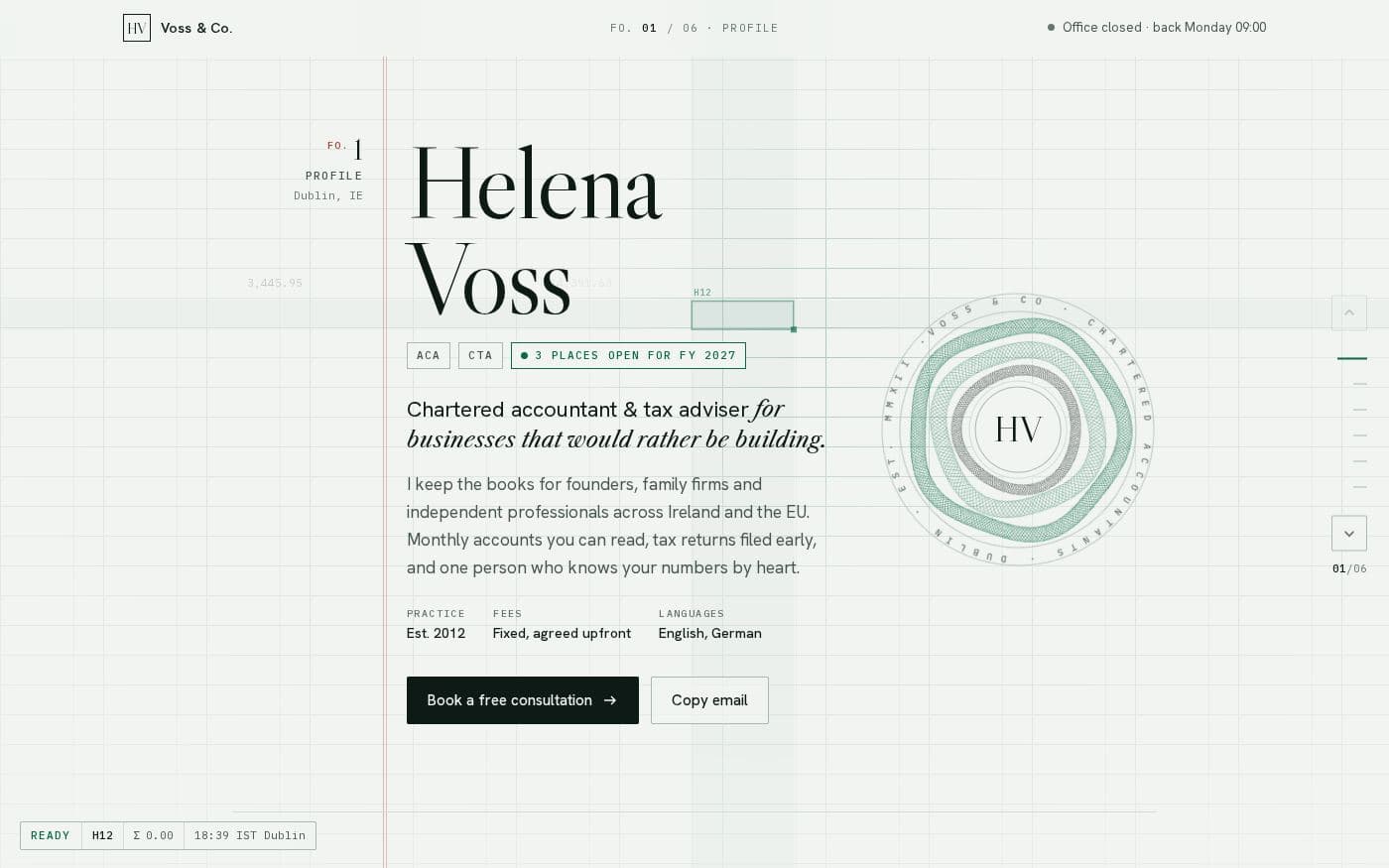
A link-in-bio page for an accountant or tax adviser, laid out as a set of ledger folios on faint grid paper. Folio 1 is your profile: name, qualifications, how many client places are open, a short paragraph on who you work for, and buttons to book a consultation or copy your email, next to a guilloche seal with your initials. The header shows whether the office is open right now, based on your hours.
Folio 2 is the link list, written as journal entries with account numbers and references — consultation, services, filing calendar, LinkedIn, newsletter and a client upload request — and each one ticks off as you hover it. Folio 3 shows the practice in numbers. Folio 4 is a services table with fixed fees and how an engagement runs. Folio 5 is a filing calendar whose deadlines count down in days from today and mark themselves filed once they pass. Folio 6 is contact. J and K step between folios, a progress bar tracks the page, and it follows the visitor's light or dark setting.
Who it is for. Accountants, bookkeepers, tax advisers and other professional-services firms who want their link page to show the same care as their work — clear prices, clear deadlines, nothing flashy.
What you change. It is one HTML file with each folio in a labelled section, so your details, links, figures and fees are plain HTML. Deadlines are dates on the list items, and the countdown works itself out. Or ask the AI editor to make the changes for you.
Why host it. Publish it at your-name.99helpers.site in a click and update it each tax year by dropping the file in again.
- link in bio
- accountant
- tax adviser
- professional services
- pricing
- elegant
What you get
- Format
- One self-contained HTML file
- Styles and scripts inline. Open it in any editor; nothing to install.
- Size
- 66.5 KB
- Copied inside our storage — nothing downloads to your computer unless you want it to.
- Your address
- my-practice.99helpers.site
- Suggested — choose any free name when you publish.
How to use the helena voss accountant bio page template
- 1
Press “Use this template”
A copy of the helena voss accountant bio page is made for you — the whole page — inside our storage. Nothing downloads, nothing to unzip.
- 2
Pick an address
Your copy lives at a name you choose on 99helpers.site, for example my-practice.99helpers.site. If it's free, it's yours. Add a password here if the page is for a select few.
- 3
Publish, then make it yours
It's live in seconds. Open it, save the page to your computer, change the words, and drop the file back in at the same address — the link never changes, and every earlier version is kept.
Hosting a page on 99helpers.com
A template is only useful once it's online. That part is what 99helpers.com does: any file or static site, at an address you choose, free.
Live in seconds
No build step, no server to set up, no FTP. Publish and the link works.
Your own address
A short, permanent name on 99helpers.site — easy to say out loud and to put on a card.
Update without changing the link
Publish again to the same address. Every version is kept; roll back in a click.
Password protection
Keep a page for a select few. Protected pages stay out of search results.
AI features, when you want them
Add a help bot, a help centre or a feedback form to any page from your dashboard.
- Everything about file hosting →
Questions about this template
- How does the filing calendar work?
- Each deadline is a list item with a date. The page counts the days from today, highlights the next one and marks past dates as filed, so it stays current without editing.
- Where do I change the fees?
- The services table is plain HTML in Folio 4: one row per service with its scope, basis and fee.
- Does the office open or closed status update itself?
- Yes. It compares the current time in your city with your opening hours and shows open or closed, with when you are back.
- Is the helena voss accountant bio page template free?
- Yes. Copying it, giving it an address and sharing the link costs nothing. You create an account at the moment you publish — that's the only step that needs one.
- Do I keep the copy if the template changes later?
- Yes. Your copy is independent from the moment it's made. If we improve the template afterwards, your page stays exactly as you published it until you change it yourself.
- How do I edit the page after publishing?
- Open your copy, save it (a single HTML file), edit it in any text editor, and publish it again to the same address. The old version is kept, so you can put it back in a click.
- Can I use my own domain?
- Your copy gets an address on 99helpers.site. That's a short, permanent link you can put anywhere. If you need it on your own domain, publish the files there with any static host — the template is plain HTML and has no dependency on us.
- Can I make it private?
- Yes. Set a password when you publish and visitors are asked for it before they see anything. Protected pages are also kept out of search results.
- What are the AI features?
- Once a page is live you can add a help bot that answers visitors' questions from its content, a searchable help centre, or a feedback form — without touching the page itself. They're optional and switched on from your dashboard.
More templates
All link in bio templates → Link in bio4 files
Personal link page
A friendly card with your photo, three big buttons and a small gallery — the classic link-in-bio, without the subscription.
 Link in bio4 files
Minimal link page
Whitespace, hairlines and one typeface. Links as quiet rows, work as a small grid — nothing else.
 Link in bio4 files
Bold link page
Thick outlines, hard shadows and three colour-blocked buttons that press down when you click them.
Your page, online in the time it took to read this
Copy the helena voss accountant bio page template, choose a name, and send the link. Change the words whenever you like.