Static site1 files · 55.4 KB
Elena Voss executive coach website template
A dark, confident one-page site for a coach or consultant: who it's for, the method in three phases, programmes with fixed fees, results, about and a contact form.
- Free to use
- Your own address
- Live in seconds
- Yours to edit
About this template
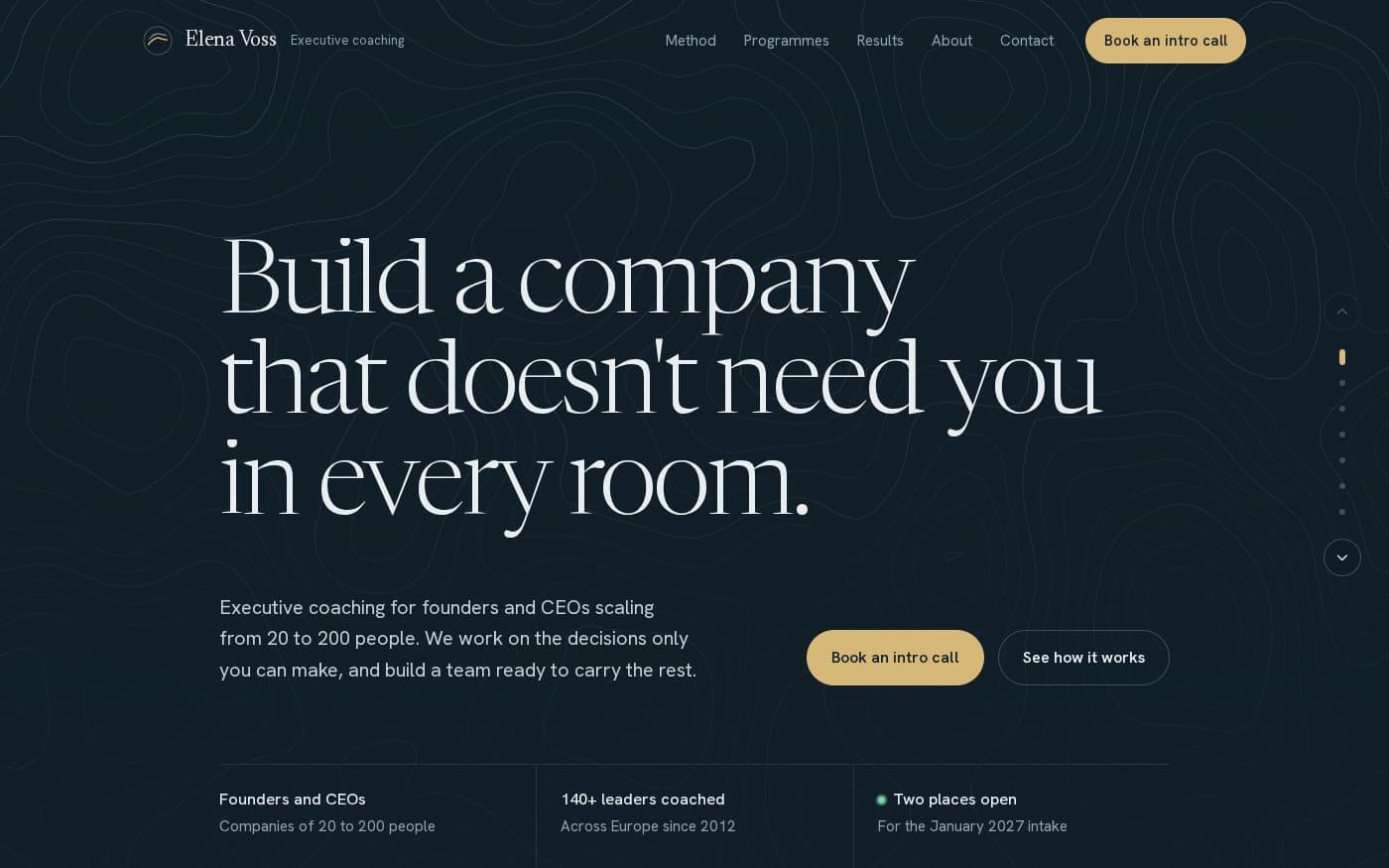
A premium website for an executive coach, set in deep navy with gold accents, a slowly shifting contour-map background and a custom cursor. The headline is set large in a fine serif, with two clear calls to action and three proof points underneath.
The sample coach is Elena Voss, who works with founders and CEOs of growing companies. Coaching helps most when… lists the situations clients recognise themselves in. The method explains a six-month engagement in three phases, each with what the client gets at the end. Ways to work together presents three programmes as cards with a fixed fee, what's included and a button to ask about each one. What changes shows the results clients can expect, About introduces the coach, and Start with a 30-minute call ends the page with a contact form. A small rail on the side shows where you are on the page and moves between sections.
Who it is for. Executive and leadership coaches, consultants, advisers and fractional executives who sell a few high-value engagements and need a site that explains the work and earns the first call.
What you change. It is a single page. The text, programmes and fees are plain HTML, and the animated background and cursor are self-contained scripts with no dependencies. Or ask the AI editor to make the changes for you.
Good to know. The contact form works as soon as the site is published: each message appears under Forms in your 99helpers dashboard and you get an email. Visitors who prefer email can use the address on the page.
Why host it. Publish it at your-name.99helpers.site in a click, connect your own domain, and update programmes and fees whenever they change.
- coach
- consultant
- executive coaching
- services
- pricing
- dark
What you get
- Format
- A static site of 1 files
- Page, styles, scripts and assets, with the links between them intact.
- Size
- 55.4 KB
- Copied inside our storage — nothing downloads to your computer unless you want it to.
- Your address
- my-coaching.99helpers.site
- Suggested — choose any free name when you publish.
How to use the elena voss executive coach website template
- 1
Press “Use this template”
A copy of the elena voss executive coach website is made for you — all 1 files of it — inside our storage. Nothing downloads, nothing to unzip.
- 2
Pick an address
Your copy lives at a name you choose on 99helpers.site, for example my-coaching.99helpers.site. If it's free, it's yours. Add a password here if the site is for a select few.
- 3
Publish, then make it yours
It's live in seconds. Open it, save the files to your computer, change the words, and drop the folder back in at the same address — the link never changes, and every earlier version is kept.
Hosting a site on 99helpers.com
A template is only useful once it's online. That part is what 99helpers.com does: any file or static site, at an address you choose, free.
Live in seconds
No build step, no server to set up, no FTP. Publish and the link works.
Your own address
A short, permanent name on 99helpers.site — easy to say out loud and to put on a card.
Update without changing the link
Publish again to the same address. Every version is kept; roll back in a click.
Password protection
Keep a page for a select few. Protected pages stay out of search results.
AI features, when you want them
Add a help bot, a help centre or a feedback form to any page from your dashboard.
- Everything about file hosting →
Questions about this template
- Does the contact form send me the messages?
- Yes. It is connected to 99helpers Forms: each message appears under Forms in your dashboard and you get an email with it.
- Can I change the programmes and fees?
- Yes. Each programme is a card in plain HTML with its name, length, fee, description and what's included. Edit them directly or ask the AI editor.
- Can I turn off the moving background?
- Yes. Ask the AI editor to switch off the contour animation or the custom cursor, or to keep the background still.
- Is the elena voss executive coach website template free?
- Yes. Copying it, giving it an address and sharing the link costs nothing. You create an account at the moment you publish — that's the only step that needs one.
- Do I keep the copy if the template changes later?
- Yes. Your copy is independent from the moment it's made. If we improve the template afterwards, your site stays exactly as you published it until you change it yourself.
- How do I edit the site after publishing?
- Open your copy, save it (the folder with all its files), edit it in any text editor, and publish it again to the same address. The old version is kept, so you can put it back in a click.
- Can I use my own domain?
- Your copy gets an address on 99helpers.site. That's a short, permanent link you can put anywhere. If you need it on your own domain, publish the files there with any static host — the template is plain HTML and has no dependency on us.
- Can I make it private?
- Yes. Set a password when you publish and visitors are asked for it before they see anything. Protected sites are also kept out of search results.
- What are the AI features?
- Once a site is live you can add a help bot that answers visitors' questions from its content, a searchable help centre, or a feedback form — without touching the site itself. They're optional and switched on from your dashboard.
More templates
All small business website templates → Small business82.9 KB
Copperline plumbing website
A complete small-business website in one file: services, flat-rate prices with an estimator, a service-area map and a booking flow.
 Portfolio24.4 KB
Portfolio one-pager
One page for your work — case studies with outcomes, skills and contact, and a light/dark switch.
 Link in bio4 files
Personal link page
A friendly card with your photo, three big buttons and a small gallery — the classic link-in-bio, without the subscription.
Your site, online in the time it took to read this
Copy the elena voss executive coach website template, choose a name, and send the link. Change the words whenever you like.