The basics
What is a GIF file?
A GIF file stores an image as a grid of numbers that point into a palette of at most 256 colours. CompuServe introduced it in 1987 for sending pictures over slow dial-up connections. The 1989 revision, GIF89a, added the features that made it famous: frame timing for animation, a transparent colour and comments.
Today GIF lives on mostly as the format for short, silent, looping animations: reactions, memes, interface demos, simple diagrams that move. Every browser, chat app and operating system can show one, with no play button and no codec to worry about. For still images and for anything longer than a few seconds, newer formats do the job better and in smaller files.
GIF's compression, LZW, was patented, and in the mid-1990s Unisys began asking for licence fees from software that wrote GIFs. That dispute is the reason PNG was created. The patent expired in 2003 in the United States and in 2004 in Europe and Japan, so GIF is now free for anyone to use.
The 256-colour limit
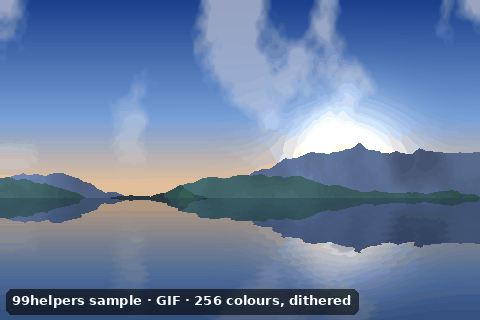
Each frame can use at most 256 colours. That's plenty for logos, pixel art and flat illustrations, but a photo has many thousands, so converting one to GIF means picking the 256 closest and dithering: scattering dots of nearby colours to fake the in-between shades. That's why photos in GIFs look grainy and gradients show bands. A frame can bring its own local colour table, so a long animation can use more than 256 colours in total, just not within one frame.
Anatomy
What's inside a GIF file
A GIF file is a header, a description of the canvas, an optional colour table, then a series of blocks: extensions and images, until a trailer byte ends it. Below is every byte of sample-1x1.gif, a single transparent pixel with a comment. Numbers are little-endian: 01 00 means 1.
47 49 46 38 39 61

01 00 01 00  80  00  00

00 00 00  FF FF FF

21 F9 04  01  00 00  00  00

21 FE 2D
46 72 65 65 20 73 61 6D 70 6C 65 20 66 72 6F 6D
20 39 39 68 65 6C 70 65 72 73 2E 63 6F 6D 2F 66
69 6C 65 2D 74 79 70 65 73 2F 67 69 66
00

2C  00 00 00 00  01 00 01 00  00

02  02 44 01  00

3B- 1
47 49 46 38 39 61The header
GIF89ain ASCII: the signature and the version. Files that use none of the 1989 additions (animation timing, transparency, comments) can sayGIF87ainstead. - 2
01 00 01 00 80 00 00Logical screen descriptor
The canvas is 1 × 1 pixel. The packed byte
80says a global colour table follows, and its lowest three bits (0) give its size: 2 to the power of (0 + 1) = 2 colours. Then the background colour index (0) and the pixel aspect ratio (0, meaning not specified). - 3
00 00 00 FF FF FFGlobal colour table
Two colours of 3 bytes each: black and white. A table holds 2, 4, 8 and so on up to 256 colours. Pixels are stored as numbers pointing into it.
- 4
21 F9 04 01 00 00 00 00Graphic control extension
21starts an extension andF9says which kind. The flags byte01switches transparency on, the delay is 0, colour index00is the transparent one, and00ends the block. In an animation, this block also sets each frame's delay and disposal method. - 5
21 FE 2D … 00Comment extension
Text for humans that viewers ignore: a sub-block of 45 bytes (
2D) reading “Free sample from 99helpers.com/file-types/gif”, then a zero-length sub-block to end it. Without this comment, the file would be the classic 43-byte transparent GIF. - 6
2C 00 00 00 00 01 00 01 00 00Image descriptor
2C(a comma in ASCII) starts an image: its position on the canvas (0, 0), its size (1 × 1) and a flags byte with no local colour table and no interlacing. Each frame of an animation has its own descriptor and can cover just part of the canvas. - 7
02 02 44 01 00LZW image data
The LZW minimum code size (2), then a 2-byte sub-block,
44 01. Read bit by bit from the lowest bit, that's three 3-bit codes: clear (4), the pixel's colour index (0) and end of information (5).00ends the data. - 8
3BThe trailer
A semicolon in ASCII: the end of the file. A GIF missing it was usually cut off during a download, though most viewers still show what's there.
Under the hood
How a GIF stores its pixels
- 1Palette. The encoder chooses up to 256 colours and replaces every pixel with the number of its colour in the table. This is the step that can lose colour detail, and it happens before compression.
- 2LZW compression. The stream of colour numbers is compressed with LZW, which builds a dictionary of sequences as it goes and replaces repeats with short codes. It's lossless: the colour numbers come back exactly. It works best on long horizontal runs of the same colour, which is why flat graphics make small GIFs and dithered photos make big ones.
- 3Sub-blocks. The compressed data is cut into pieces of at most 255 bytes, each preceded by its length, and ended by a zero-length block. Extensions use the same scheme, so a decoder can skip any block it doesn't understand.
A GIF can also be interlaced: rows are stored in four passes (every 8th row from row 0, every 8th row from row 4, every 4th row from row 2, then the odd rows), so a slow download shows a rough version of the whole picture early. It makes little difference today.
Animation
How animated GIFs work: frames, delays and loops
An animated GIF is simply several images in one file, each preceded by a graphic control extension that says how long to show it and what to do with it afterwards.
| Setting | Where it lives | What it does |
|---|---|---|
| Delay | Graphic control extension | How long the frame stays on screen, in hundredths of a second. 10 = 0.1 s. |
| Disposal method | Graphic control extension | What happens to the frame before the next one: 1 leaves it in place, 2 clears its area to the background, 3 restores what was there before. |
| Frame position and size | Image descriptor | A frame can cover just the part of the canvas that changed, which keeps animations small. |
| Loop count | NETSCAPE2.0 application extension | 0 means loop forever. Without this block, the animation plays once and stops on its last frame. |
The loop setting isn't part of the GIF89a specification at all. It's an application extension introduced by Netscape Navigator 2.0 in the 1990s, and every browser has honoured it since.
Why is my GIF playing too slowly?
Browsers usually raise a delay of 0 or 1 hundredth of a second to 0.1 s, to stop badly made GIFs from hogging the processor. So a GIF made with a delay of 0.01 s can play ten times slower than intended. A delay of 0.02 s (50 frames per second) is the shortest that usually plays as written.
Transparency
GIF transparency, and the white halo problem
A GIF can mark one colour in its palette as transparent. Pixels with that colour are invisible; all others are fully solid. There's no partial transparency, so soft shadows and smooth edges are impossible.
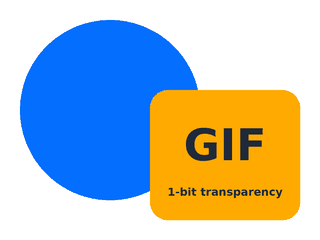
That causes the classic halo: a shape is drawn with smooth, anti-aliased edges against a white background, white is made transparent, and the pale in-between pixels at the edge stay behind as a light fringe. It's invisible on a white page and obvious on a dark one. sample-transparent.gif below shows it on purpose.
- Fix it at export: set the matte (or background) colour to the colour of the page the GIF will sit on, so the edge pixels blend towards it.
- Or use a format with real alpha: PNG, WebP or AVIF give smooth edges on any background.
Comparison
GIF vs PNG, WebP and MP4
| GIF | PNG / APNG | Animated WebP | MP4 video | |
|---|---|---|---|---|
| Colours per frame | 256 | Millions | Millions | Millions |
| Transparency | On/off per pixel | Full alpha | Full alpha | Not in common codecs |
| File size for an animation | Largest | Large | Smaller | Smallest by far |
| Sound | No | No | No | Yes |
Plays automatically in <img> | Yes | Yes | Yes | Only in Safari; elsewhere use <video autoplay muted loop> |
| Works everywhere | Yes | In all current browsers | In all current browsers | Yes, as video |
Google's measurements found animated GIFs converted to lossy WebP were 64% smaller on average, and 19% smaller as lossless WebP. Our own samples agree: the bouncing-ball animation is 25,087 bytes as sample-animated.gif and 13,384 bytes as lossless animated WebP on our WebP page. Video compresses better still, which is why many sites quietly convert uploaded GIFs to MP4 and play them as looping, muted videos.
For a still image, PNG beats GIF on every count: more colours, real transparency and usually a smaller file.
Troubleshooting
Why is my GIF huge, grainy or not moving?
- It's huge. Long, large or photographic GIFs balloon quickly. Shorten it, cut the frame rate, reduce the dimensions and the colours, or optimise it with
gifsicle -O3 in.gif -o out.gif. For anything over a few seconds, use MP4 or WebP instead. - It looks grainy or banded. That's the 256-colour limit and dithering. Use fewer gradients, or a format without the limit.
- It doesn't move. Some apps show only the first frame: several email clients (notably older desktop versions of Outlook), document editors, and some image previews. Some upload pipelines also resize a GIF by keeping only its first frame. Make sure the first frame works on its own.
- It plays once and stops. The file has no
NETSCAPE2.0loop block, or a loop count above 0. Re-save it with looping set to forever, for examplegifsicle --loopcount=forever. - It plays at the wrong speed. See the note about delays above: very short delays get slowed down to 0.1 s.
How to
How to open, edit, make and convert a GIF
- Open it: drag it into a browser window, which always plays the animation. Windows Photos plays GIFs; on a Mac, select the file and press Space for Quick Look, or open it in Preview to see the frames one by one.
- Edit it: GIMP opens each frame as a layer, with the delay in the layer name. Photoshop uses its Timeline panel. Online editors such as ezgif handle cropping, resizing and speed changes.
- Make one from a video:
ffmpeg -i clip.mp4 -vf "fps=12,scale=480:-1:flags=lanczos,split[a][b];[a]palettegen[p];[b][p]paletteuse" clip.gif. Building a palette from the clip itself (palettegen) gives far better colours than the default. - Convert a GIF to MP4:
ffmpeg -i in.gif -movflags +faststart -pix_fmt yuv420p -vf "scale=trunc(iw/2)*2:trunc(ih/2)*2" out.mp4. The scale filter makes the size even, which the H.264 codec needs. - Convert to WebP:
gif2webp in.gif -o out.webpfrom Google's WebP tools keeps the animation.
Privacy and access
Tracking pixels, and animations that need care
The tiny 1 × 1 transparent GIF, like sample-1x1.gif below, has a second life as a tracking pixel. A newsletter includes one with a unique address per recipient; when your email app loads images, the request tells the sender you opened the email, when, and roughly where from. Blocking remote images in your email app, or using an app that loads them through a proxy, stops most of this.
Animated GIFs also start playing on their own and usually can't be paused. The Web Content Accessibility Guidelines ask for:
- A way to pause, stop or hide anything that moves automatically for more than five seconds (WCAG success criterion 2.2.2).
- No more than three flashes in any one second (success criterion 2.3.1), because rapid flashing can trigger seizures.
- A text alternative in the
altattribute that says what the animation shows.
Free downloads
Sample GIF files to download
Free sample GIF files for testing animation, looping, transparency, interlacing and decoders. Each one was generated from code and decodes cleanly in Pillow, ImageMagick and FFmpeg.
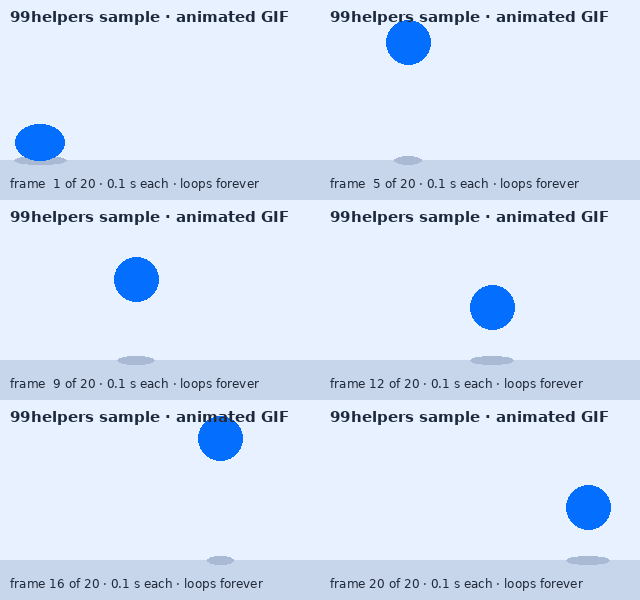
What's inside sample-animated.gif
sample-animated.gif is a 2-second bouncing-ball loop. Here is what a GIF parser finds inside it, block by block.
Header and screen descriptor
GIF89a, a 320 × 200 canvas and a flag saying a global colour table follows.Global colour table: 32 colours
96 bytes, shared by all 20 frames. The artwork uses flat colours, so 32 are enough and nothing needs dithering.
NETSCAPE2.0 application extension
Loop count 0: play forever. Delete this block and the animation plays once.
Comment extension
"Free sample from 99helpers.com/file-types/gif". Viewers never show it.
20 graphic control extensions
One before each frame: a delay of 10 hundredths of a second (0.1 s, so 10 frames per second) and disposal method 1, which leaves each frame in place for the next to draw over.
Frame 1: the full canvas
320 × 200 pixels, about 2.8 KB of LZW data, with no local colour table.
Frames 2 to 20: only what changed
Each later frame covers just the rectangle around the ball, its shadow and the frame counter, for example 61 × 103 pixels at position (14, 85) in frame 2. That's how the whole file stays at about 25 KB.
The trailer
A single
3Bbyte ends the file.
All sample GIF files
Animated GIF (looping)
sample-animated.gif · 24.5 KB (25,087 bytes)
A 320 × 200 bouncing ball: 20 frames at 0.1 s, looping forever, with one 32-colour global palette and frames cropped to the area that changed.
- Checking animation survives upload, resizing and previews
- Comparing GIF with animated WebP and video
Animated GIF that plays once
sample-plays-once.gif · 6.1 KB (6,265 bytes)
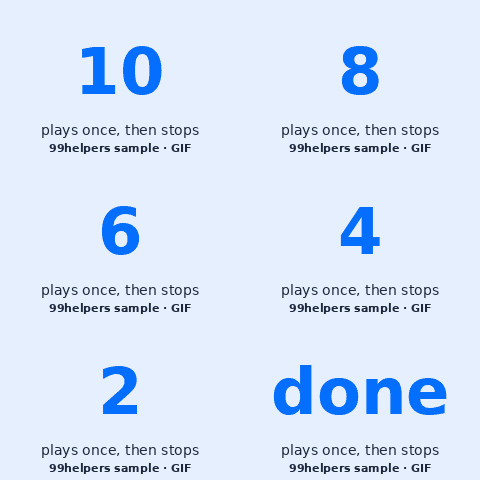
A countdown from 10 that ends on "done". It has no
NETSCAPE2.0block, so it plays a single time and stops on the last frame. Reload the page to replay it.- Testing loop handling in players and converters
- Checking a pipeline doesn't add or remove looping
Still GIF with 256 colours
sample-static.gif · 30.6 KB (31,309 bytes)
A 480 × 320 photo-style landscape reduced to a 256-colour palette with Floyd–Steinberg dithering. Look at the sky around the sun to see the limit.
- Seeing the 256-colour limit and dithering
- Decoder tests for full-size palettes
Transparent GIF (with halo)
sample-transparent.gif · 5.8 KB (5,957 bytes)
A 320 × 240 graphic with one transparent palette colour. Shapes were drawn anti-aliased on white, so a pale halo shows on dark backgrounds, on purpose.
- Testing transparency on light and dark backgrounds
- Checking conversion to PNG keeps the transparent colour
Interlaced GIF
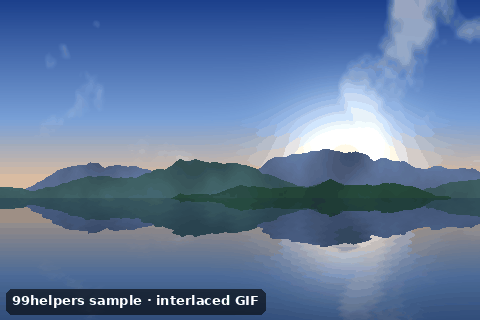
sample-interlaced.gif · 37.4 KB (38,249 bytes)
A 480 × 320 still image with the interlace flag set, so its rows are stored in four passes.
- Decoder tests for interlaced GIFs
- Seeing interlaced loading on a throttled connection
1 × 1 transparent GIF (92 bytes)
sample-1x1.gif · 92 bytes
A single transparent pixel plus a comment, every byte explained in the anatomy above. Without the comment, it's the classic 43-byte spacer and tracking-pixel GIF.
- Learning the block structure in a hex editor
- Testing very small uploads and edge cases

Ways to test with them
- Animation kept: after uploading or resizing
sample-animated.gif, the ball should still bounce. A still ball means only the first frame was kept. - Looping:
sample-plays-once.gifshould stop on "done", andsample-animated.gifshould never stop. A converter that changes either is rewriting the loop count. - Transparency: show
sample-transparent.gifon a dark background. A white box means transparency was lost; a thin white fringe is expected. - Tiny files: some upload validators reject very small files or 1 × 1 images.
sample-1x1.giffinds out.
Free to use for testing, teaching and demos, commercially or not, with no attribution needed. A link back to this page is always appreciated.
Put it online
Have a GIF? Give it a link.
Drop a GIF on 99helpers and it gets its own web address. Anyone who opens the link sees it play straight away in their browser, looping as it was made, without downloading anything.
Questions
GIF files, frequently asked
What does GIF stand for?
Graphics Interchange Format. It was created by CompuServe in 1987.
How do you pronounce GIF?
Both ways are common. Its creator, Steve Wilhite of CompuServe, said "jif", like the peanut butter; many people say it with a hard g, as in "gift". Everyone will understand either.
Why do GIFs have only 256 colours?
Each pixel is stored as an 8-bit number pointing into a colour table, and 8 bits can count to 256. That saved space on 1980s hardware. Each frame can have its own table, but one frame can never show more than 256 colours.
Can a GIF have sound?
No. GIF has no audio. "GIFs with sound" on websites and apps are actually short videos.
How do I make a GIF loop forever?
Set the loop count to 0 (forever) when exporting, or run gifsicle --loopcount=forever in.gif > out.gif. Without a loop setting, a GIF plays once.
Why is my GIF file so big?
GIF compression is old and weak, and every frame is a full picture or a patch of one. Cut the length, size, frame rate or colours, or convert it to MP4 or WebP, which are often a fraction of the size.
Is GIF lossless?
The compression is lossless, but reducing an image to 256 colours usually isn't. Graphics with 256 colours or fewer survive exactly; photos lose colour detail.
How do I put a GIF on a website?
Like any image: <img src="animation.gif" alt="what it shows">. It plays and loops automatically. For long animations, a muted, looping <video> is lighter.
Related formats
Other file types explained
Keep going
Related
Sources
- GIF89a specification (CompuServe, hosted by the W3C)
- Library of Congress: GIF 89a format description
- MDN: Image file type and format guide
- Google for Developers: WebP FAQ (animated GIF comparison)
- W3C: Web Content Accessibility Guidelines (WCAG) 2.2
- MathWorks blog: puzzles about GIF DelayTime (browser delay handling)
Last reviewed 27 October 2026.