The basics
What is a web app manifest file?
A web app manifest is the piece of a progressive web app (PWA) that describes the app to the operating system. A page points to it with a <link rel="manifest"> tag; the browser reads it and uses it when someone installs the site: for the name and icon on the home screen or in the Start menu, the colours of the app window, the page it opens on and the shortcuts on its icon.
The file is plain JSON, so it follows JSON's rules: double quotes, no trailing commas, no comments. It's usually called manifest.webmanifest, site.webmanifest (the name many favicon generators use) or manifest.json. The name doesn't matter to browsers; the <link> tag does.
Three things a manifest is not:
- Not the app. It only describes it. The pages, scripts and styles are ordinary web files, and offline support comes from a service worker, a separate script.
- Not a browser extension manifest. Chrome and Firefox extensions also have a
manifest.json, withmanifest_versionand permissions. It's a different format for a different purpose. - Not an app store listing. Members such as
description,screenshotsandcategoriesare there for app stores to use, but the manifest doesn't publish anything by itself.
Anatomy
What's inside a web app manifest
A manifest is one JSON object. Every member is optional in the specification, but browsers need some of them before they treat a site as installable. Here is a small but complete manifest for an app at the root of its site, part by part.
{
  "id": "/",
  "name": "Sample Notes",
  "short_name": "Notes",
  "start_url": "/?source=pwa",
  "scope": "/",
  "display": "standalone",
  "theme_color": "#046eff",
  "background_color": "#ffffff",
  "icons": [
    { "src": "/icons/192.png", "sizes": "192x192", "type": "image/png" },
    { "src": "/icons/512.png", "sizes": "512x512", "type": "image/png" },
    { "src": "/icons/maskable-512.png", "sizes": "512x512",
      "type": "image/png", "purpose": "maskable" }
  ],
  "shortcuts": [
    { "name": "New note", "url": "/new" }
  ]
}- 1
"id": "/"The app's identity
A string the browser uses to tell installed apps apart, resolved against the origin of
start_url. Without it, thestart_urlis the identity, so changing the start URL later turns the app into a different one for users who already installed it. - 2
"name": "Sample Notes"The full name
Shown in the install dialog, the app list and the splash screen.
- 3
"short_name": "Notes"The short name
Used where space is tight, such as under an icon on a phone's home screen. Chromium accepts either
nameorshort_name, but needs at least one. - 4
"start_url": "/?source=pwa"The start page
What opens when someone launches the installed app. It must be on the same origin as the page that links the manifest; a query string like this one lets your analytics count launches from the installed app.
- 5
"scope": "/"The scope
Which URLs belong to the app. Navigating outside it shows browser UI again or opens a normal tab. If omitted, it's the folder of
start_url, so an app starting at/app/index.htmldoesn't cover/settings. - 6
"display": "standalone"The display mode
standaloneopens in its own window without an address bar. The others arefullscreen,minimal-ui(a few navigation buttons) andbrowser(a normal tab). If a browser doesn't support the requested mode, it falls back along that list. - 7
"theme_color": "#046eff"The theme colour
Colours the title bar, toolbar or status bar of the app window. In Chromium, a
<meta name="theme-color">tag on a page takes precedence while that page is open. - 8
"background_color": "#ffffff"The background colour
Fills the window, and on Android the splash screen, before the page's stylesheet has loaded. The specification says browsers must stop using it once the stylesheet is available.
- 9
"icons": [ … ]The icons
Each has a
src, resolved relative to the manifest's own URL, plussizesandtype. Chromium browsers want a 192 × 192 and a 512 × 512 icon. - 10
"purpose": "maskable"A maskable icon
A full-bleed icon that the platform crops to its own shape: circle, squircle or rounded square. Everything important must sit inside the central circle whose radius is 40% of the icon's width.
- 11
"shortcuts": [ … ]Shortcuts
Jump-list entries shown when you right-click or long-press the installed app's icon. Each needs a
nameand aurlinside the scope.
Under the hood
How a browser finds and reads the manifest
<head>
  <link rel="manifest" href="/manifest.webmanifest">
  <meta name="theme-color" content="#046eff">
  <link rel="apple-touch-icon" href="/apple-touch-icon.png">
</head>- 1It finds the link. The
<link rel="manifest">tag must be in the<head>. Each page that should offer installation needs it, not only the home page. - 2It fetches the file. A manifest on another origin needs CORS. If the manifest sits behind a login, the link needs
crossorigin="use-credentials", even on the same origin, or the browser requests it without cookies. - 3It parses the JSON. If the file isn't valid JSON, the specification says to treat it as an empty object: every member is lost at once.
- 4It resolves the URLs.
start_url,scope, iconsrcand shortcut URLs are relative to the manifest's own address, not the page's. Members that break the rules, such as astart_urlon another origin, are dropped. - 5It applies it when the site is installed: name and icons for the launcher,
displayandtheme_colorfor the window, andname,background_colorand icons for the splash screen.
Why the extension doesn't matter much
The specification registers .webmanifest and application/manifest+json, but says any JSON MIME type is acceptable. In our test, Chromium 141 even parsed a manifest served as text/plain. Serve the registered type anyway; it costs one line of server configuration.
Reference
The members you'll actually use
| Member | What it does | Defined in |
|---|---|---|
name, short_name | Full and short app name | W3C specification |
start_url, scope, id | Start page, the URLs that belong to the app, and its identity | W3C specification |
display | fullscreen, standalone, minimal-ui or browser | W3C specification |
icons | App icons with src, sizes, type and purpose | W3C specification |
theme_color, background_color | Window and splash colours | W3C specification |
shortcuts | Jump-list entries on the app icon | W3C specification |
lang, dir, orientation | Language, text direction and preferred screen orientation; MDN notes that browsers don't implement lang and dir | W3C specification |
description, screenshots, categories | Descriptions and previews for app stores | W3C Note: Application Information |
display_override | An ordered list of display modes to try before display, including window-controls-overlay and tabbed | WICG Manifest Incubations (experimental) |
file_handlers, protocol_handlers, share_target, launch_handler | Let an installed app open files, handle links, receive shared content and control how it launches | Incubations; mostly Chromium only |
Browsers ignore members they don't know, so adding an experimental one never breaks a manifest. Check MDN's compatibility table before relying on one.
Installing
What each browser needs before it offers to install
Installability is decided by each browser, not by the specification. According to MDN, every browser that installs PWAs requires HTTPS, or localhost for development. Chromium-based browsers (Chrome, Edge, Samsung Internet) also require a manifest with:
nameorshort_nameiconswith a 192 px and a 512 px icon (in our test Chromium 141 accepted either one alone, but don't rely on it)start_urldisplayand/ordisplay_override(in our test,"display": "browser"alone was refused)prefer_related_applicationsset tofalseor left out
| Platform | What happens |
|---|---|
| Chrome, Edge (desktop) | Install from the address bar or menu, using the manifest. Both can also install any site as an app without one. |
| Safari on macOS | File, Add to Dock (Safari 17 and later), with or without a manifest. |
| Firefox (desktop) | Doesn't install PWAs from a manifest. |
| Android | Chrome (with Google services) and Samsung Internet install a real app package (a WebAPK). Other browsers add a home-screen shortcut that opens in the browser. |
| iPhone and iPad | Add to Home Screen from the Share menu: Safari only up to iOS 16.3; Safari, Chrome, Edge, Firefox and Orion from iOS 16.4. |
A service worker is not required for installation, but most PWAs use one to keep working offline.
Icons
Icons: maskable, monochrome and apple-touch-icon
any(the default) is a normal icon, drawn like a favicon with transparent corners where you want them.maskableis full-bleed: the platform cuts it to its own shape. Keep the content inside the central circle with a radius of 40% of the width; the outer 10% may be cropped on some platforms. Google's web.dev advises keeping separateanyandmaskableicons rather than one icon marked"any maskable", which would look shrunk where it isn't masked.monochromeis used as a silhouette: the browser keeps only the alpha channel and fills it with a single colour.
iPhone and iPad. For years Safari ignored manifest icons and used only the non-standard <link rel="apple-touch-icon">, a PNG of 180 × 180 pixels for current iPhones. Safari on iOS 15.4 started reading manifest icons. Many sites still include an apple-touch-icon for older devices and to control exactly which image iOS uses; it does no harm alongside the manifest.
Troubleshooting
Why isn't my site installable?
We ran broken versions of our samples through Chromium 141's manifest checker (the same one the Application panel of Chrome's developer tools uses). These are the problems people hit most:
| Problem | What Chromium did | Fix |
|---|---|---|
| An icon URL returns 404 | Not installable ("no acceptable icon"), even though the 512 px icon loaded fine | Icon paths are relative to the manifest, not the page; open each one in a browser |
| A trailing comma or a comment | Parse error, and every member was ignored | Validate it as JSON: python3 -m json.tool manifest.webmanifest |
start_url outside scope | Warned "property 'scope' ignored" and used the folder of start_url as the scope | Make scope a parent of start_url, often "/" |
No start_url | Not installable ("start URL not valid") | Add one, even just "." |
No name or short_name | Not installable | Add at least one |
Served as text/plain | Accepted | Serve application/manifest+json anyway, for other browsers and tools |
Two more that don't show up in a checker: a manifest behind a login fails silently without crossorigin="use-credentials", and changing start_url without a fixed id makes existing installs look like a different app. Set id before you launch.
How to
How to open, edit and check a manifest
- Open or edit it: any text or code editor. VS Code recognises
.webmanifestfiles as JSON and suggests member names. - Check what the browser sees: open the site in Chrome or Edge, then Developer tools, Application, Manifest. It shows the parsed values, every icon and the errors and warnings that block installation.
- Validate the JSON:
python3 -m json.tool manifest.webmanifestorjq . manifest.webmanifestreport the line and column of a syntax error. - Test it online: a manifest only works from a web address. Put the files online together with the page that links them, over HTTPS.
- Make icons: export a square PNG at 512 × 512 and 192 × 192; for the maskable one, fill the whole square and keep the logo within the central 80%.
Free downloads
Sample web app manifests to download
Free sample manifests and the icons and screenshot they refer to, for testing PWAs, validators and servers. Each manifest is valid JSON and passed Chromium 141's installability check with no errors when served next to its images.
Loading…What's inside sample-full.webmanifest
JSON has no comments, so here is what each part of sample-full.webmanifest does. All its URLs are relative, so it works from any folder as long as the images sit next to it.
Names and description
namefor install dialogs,short_namefor the home screen, and adescriptionthat mentions where the file came from.`lang` and `dir`
Language and text direction of the name and description. Part of the specification, though MDN notes browsers don't implement them yet.
`start_url` and `scope`
./?source=pwaand./, both relative to the manifest. Served from/samples/webmanifest/, the app starts at/samples/webmanifest/?source=pwaand covers that folder.`display` and `orientation`
A standalone window, in any orientation.
Colours
theme_colorfor the window bar andbackground_colorfor the splash screen.Three icons
192 and 512 px icons with the default purpose, and a separate 512 px maskable icon.
Shortcuts
Two jump-list entries, one with a
short_nameand adescription, each with a 192 px icon.Screenshots and categories
A 1280 × 720 screenshot marked
"form_factor": "wide"with alabel, andcategories: previews and hints for app stores.
All sample Web app manifest files
Complete PWA manifest
sample-full.webmanifest · 1.5 KB (1,543 bytes)
Name, short name, description, language, start URL, scope, display, orientation, colours, three icons including a maskable one, two shortcuts, a screenshot and categories.
- A starting point for a real PWA
- Testing manifest parsers and validators
Minimal installable manifest
sample-minimal.webmanifest · 295 bytes
Only what Chromium requires:
name,start_url,displayand the 192 and 512 px icons.- Finding out which members a tool insists on
- The smallest manifest that installs
Manifest with id and display_override
sample-display-override.webmanifest · 668 bytes
A fixed
idof/sample-notes, which Chromium resolves tohttps://<your-site>/sample-notes, anddisplay_overrideasking forwindow-controls-overlay, thenminimal-ui, before falling back to"display": "standalone".- Testing app identity across start URL changes
- Desktop window modes in Chromium
Icon, 192 × 192
sample-icon-192.png · 6.2 KB (6,363 bytes)
A rounded-square icon with transparent corners, purpose
any.- The smaller required icon size
Icon, 512 × 512
sample-icon-512.png · 16.9 KB (17,288 bytes)
The same icon at 512 × 512.
- The larger required icon size
- Splash screens
Maskable icon, 512 × 512
sample-icon-maskable-512.png · 9.2 KB (9,407 bytes)
A full-bleed icon with the design inside the central safe-zone circle, so any mask shape keeps it whole.
- Testing maskable icon handling
- Comparing with the `any` icon
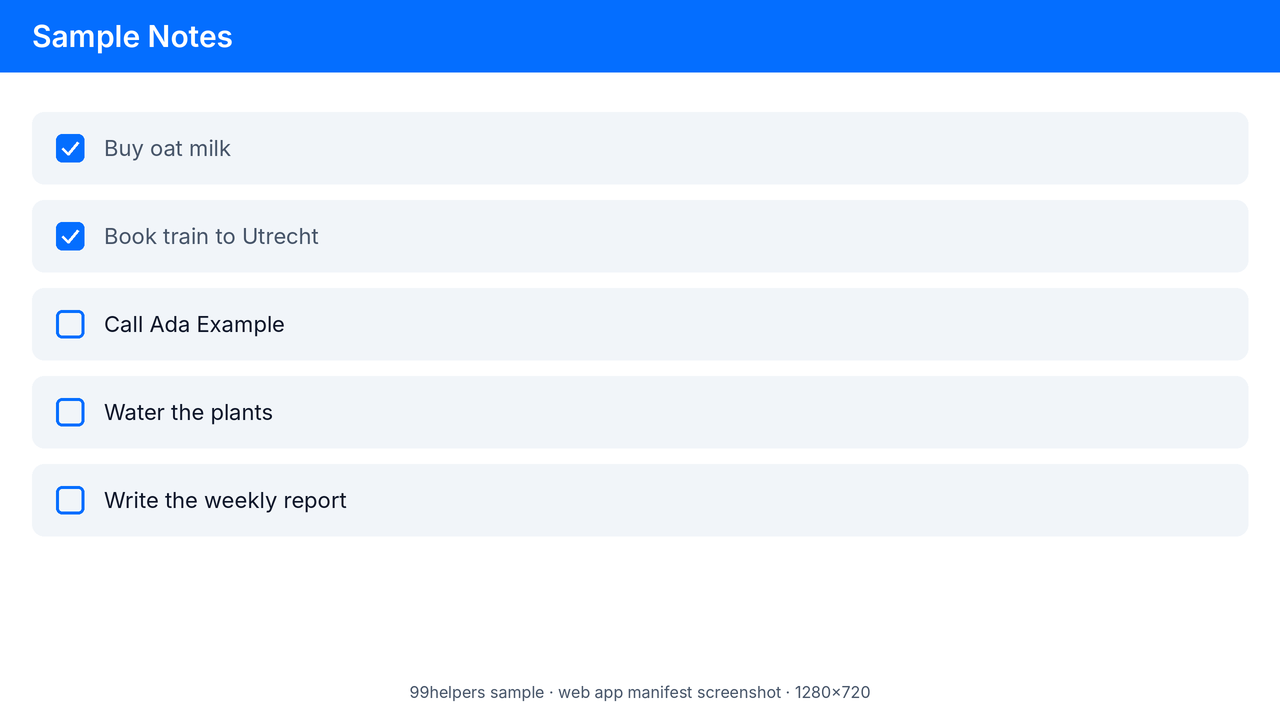
Wide screenshot, 1280 × 720
sample-screenshot-wide.png · 56.9 KB (58,313 bytes)
The screenshot
sample-full.webmanifestlists, showing a fictional notes app.- Richer install dialogs
- Testing the screenshots member
Ways to test with them
- Installability: put the folder online, add
<link rel="manifest" href="sample-minimal.webmanifest">to a page in it, and open Developer tools, Application, Manifest in Chrome. There should be no errors. - Icon paths: move a manifest into another folder without its PNG files and watch the icons fail: their URLs are relative to the manifest.
- App identity: install from
sample-display-override.webmanifest, change itsstart_url, and the browser should still treat it as the same app, becauseiddidn't change. - Server MIME types: check that your server sends
.webmanifestfiles asapplication/manifest+json.
Free to use for testing, teaching and demos, commercially or not, with no attribution needed. A link back to this page is always appreciated.
Put it online
Have a web app manifest? Give it a link.
Drop a .webmanifest file on 99helpers and it gets its own address; opened in a browser, it shows as text. A site hosted on 99helpers can link it from its pages with <link rel="manifest">.
Questions
Web app manifest files, frequently asked
What is a .webmanifest file?
A JSON file that describes a web app to the browser and operating system: its name, icons, colours, start page and how its window looks once installed.
Should I use manifest.webmanifest or manifest.json?
Either works. .webmanifest is the extension registered in the specification, but browsers read whatever file the <link rel="manifest"> tag points to. What matters is that the content is valid JSON.
What is the MIME type for a web app manifest?
application/manifest+json. The specification also accepts other JSON types, and Chromium doesn't enforce it, but it's the correct one to configure.
Why is my PWA not installable?
Usually an icon URL that doesn't load, a missing start_url, name or 192 and 512 px icons, "display": "browser", invalid JSON, or a site not served over HTTPS. Chrome's developer tools list the exact reason under Application, Manifest.
Does a PWA need a service worker to be installable?
Not any more, according to MDN. A service worker is what makes the app work offline, so most PWAs still have one.
What is a maskable icon?
An icon designed to be cropped into different shapes by the platform. It fills the whole square, and its important content stays inside a central circle with a radius of 40% of the icon's width.
Does iOS use the web app manifest?
Partly. Safari uses it for things like the name and display mode, and has read its icons since iOS 15.4. Many sites still add an apple-touch-icon link for older devices.
Can I put comments in a manifest?
No. It's JSON, and a comment makes the whole file invalid, so the browser ignores every member. Use a separate README or commit messages for notes.
Related formats
Other file types explained
Keep going
Related
Sources
- Web Application Manifest (W3C Working Draft)
- MDN: Web app manifest members reference
- MDN: Making PWAs installable
- WebKit bug 235877: manifest icons in Safari on iOS 15.4
- web.dev: Adaptive icon support in PWAs with maskable icons
- Chrome for Developers: Preparing for the display modes of tomorrow
Last reviewed 27 October 2026.